Communicating Value through Cause & Effect on Fanfeedr

by Joshua Porter  |   7 Comments  |  shortlink: http://bokardo.com/p/1524

A few months ago we held an event called Testcase at Betahouse in Cambridge, MA where we asked four startups to come and user test their web sites with local folks who showed up. Despite the super informal user testing method we used, we clearly saw that each startup struggled with communicating the value of their service. This is a common problem…founders have a really awesome idea but it just isn’t communicated to people clearly.

FanFeedr: Personalized sports search.

One of the startups, Fanfeedr, was in super-early alpha at the time. The primary finding from testing their site was that people didn’t immediately grok what the service was. A feed for fans wasn’t entirely clear…were the fans creating the feeds? What did the feed look like? Was it something people used on the site or off the site (like RSS)? These issues compounded to make the service unclear.

The end result was that people didn’t realize that the service was built around the idea that you declare your interests and then Fanfeedr essentially sets up a firehose of information for you around the teams you like. You come to Fanfeedr and get a personalized sports page. When talking with folks afterward, most people loved the concept and wanted a service to do this. The problem was that it wasn’t being communicated in the interface.

Well, Fanfeedr has been evolving since Testcase and now has a nice intro screen (you might even call it a splash page) for new visitors. They’ve directly addressed some of the issues we saw in testing, and now it’s much more clear how the service works.
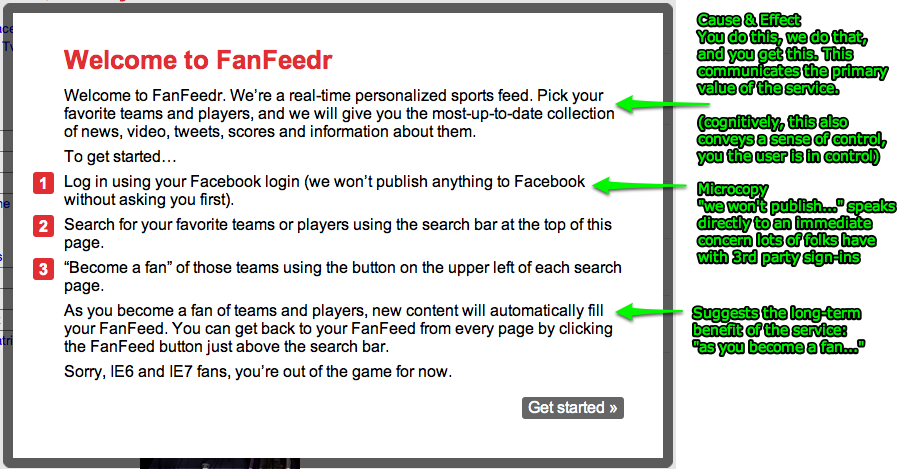
FanFeedr: Annotated

Notice that Fanfeedr is now being explicit about cause and effect. They say “Pick your favorite team and players, and we’ll give you the most up-to-date collection of news, videos, tweets, scores, and information about them”. This is it…the primary value of the service in a single sentence. If Fanfeedr is around five years from now this will still be their primary value proposition.

They’ve also got an example of microcopy in the line “we won’t publish anything to Facebook without asking you first”. This is a concern that lots of folks have with 3rd party sign-ins, and Fanfeedr is addressing it up front.

And finally they’ve included a nice list of how to get started. (I recently wrote about a variant of this technique that I call The Strikethrough Method)

While screens like this are trivial to build, they are not always easy to design. In some cases, you simply don’t know how best to explain what you’re building (this is the elephant in the room in many startups). In other cases, the value you think you’re providing isn’t the same value that people are hearing (more common than one might think). Doing quick user tests can get you over this hurdle, teaching you about what people see as the core value, and also telling you about what microcopy you might need for contingencies.

The screen is not perfect, however. For one thing, the statement of value is by far the most important content on the page. Bolding that sentence, at the least, would help. In the current design attention is drawn to the red numbered list first (red is powerful at drawing attention, as is the visually outdented list) Some people won’t even read the starting paragraph containing the value proposition…they’ll simply skip it and start at the list.

Visual design aside, Fanfeedr, in a few lines of html text, now give a much more clear picture of what the service does than they did back in April. This is the essence of design…iterate…test…iterate…test…ad infinitum

So who else communicates their value well? As part of my upcoming book Make them Care!, I’m looking for exemplars of this sort of clear communication around service value. If you’ve got a service that does this well, or know of one, let me know and I’ll consider it for the book.

Check out my latest project: Make them Care!, a book on designing great sign-up experiences. Get reminded when it's published.

Links to this Post

Comments

1.  Elad Kehat 2:47am, Fri 18th, 2009

Thanks for this great post on an extremely important issue for new startups.
We faced a similar issue with DemandSpot.com but chose a different path, that proved to be very successful.
Our own homepage has a very similar “firehose of information” look, but instead of putting up a screen that explains what we do, we make an educated guess on what the visitor might like to see, and show that in the firehose.
In our case we show tweets from people who are interested in buying real estate. Since location is everything in this market, we use visitors’ IP addresses to pre-filter the information and show just people in their area. A few live tests proved that hilighting the relevant part of the tweets, and keeping the website generally clear of any clutter (just one column) make people understand what it’s all about within seconds. Further testing has led us to put the call-to-action (what you can do with this information) on a simple button next to every tweet that says “Connect with…”.
Results so far: 12% of new visitors sign-up.
You didn’t expand on how well the welcome screen is working for FanFeedr, but my biggest concern with such screens is that visitors don’t really feel like reading. They may want to see the product right away, or if they do read, they may get “tired” from it and go away. I personally prefer products that explain themselves. If I were in FanFeedr’s place, I’d ditch the text on the welcome screen in favor of a visual selection between some local team logos in various sports (sports fans usually go for their home teams, right?). Use visitors’ IPs to figure out the locality. The user could click/check some team logos, and get right to a custumized feed. That’s both self-explanatory and makes good use of your time on the welcome screen to start customizing the product for you right away.

2.  Wendy Sharp 8:48pm, Fri 18th, 2009

The repetition of the headline in the first line of the first paragraph kills me. It’s the kind of thing that would make me stop reading at once, because if they have to say the same thing twice, immediately, it’s usually a safe bet that whatever else they have to say is going to be content-free. And yet, you’re right–they’ve done a nice job with the rest of it. But the first paragraph should start with “Pick your…”, rather than a repeat of the headline.

3.  Adrian Chan 8:28am, Tue 22nd, 2009

Good tips Josh,

I’ve often wished that in addition to describing what the product does, by means of features, some companies would also describe the problem they’re solving, why it matters, and how they’re solving it. This is especially the case for me at demos, where presentations are feature rich but often scarce on what the product is for.

It might just be me, but I like to know what I’m going to get out of a new site as much as I want to know what the technology does.

cheers,
a

4.  Christina Sponias 10:18pm, Thu 24th, 2009

Your articles are always fascinating! Social design is really basic online, and the startup fundamental, especially because nobody really reads anything on the internet.

The first impression holds the visitors’ attention, or sends them somewhere else in a second.

5.  christina 9:54am, Tue 29th, 2009

it is way to text-ty still, though. there are many services that have to prove their value that hae a hard time doing so until the user signs up; blogger, remember the milk, netflix– fanfeedr should survey these services for best practices in clarity. Netflix in particular is known to AB test the holy heck out of their site, and is probably worth emulating. If I saw that wall of test, I’d be gone in 30 seconds. It’s not just what you say (though that’s critical) but how you say it.