Interface Compare: Inviting Friends on MySpace & Facebook

by Joshua Porter  |   13 Comments

I’m introducing a new type of post here at Bokardo called “Interface Compare”. I’ll use it to compare interfaces from different services to highlight interesting things designers are doing (or not doing). The first installment is comparing the Invite screens on MySpace and Facebook.

MySpace Invite Screen
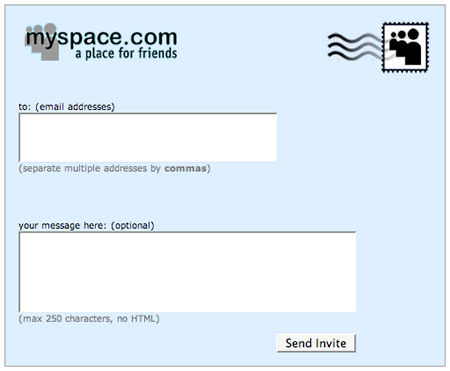
MySpace Invite Friends

The interface for this is pretty straightforward. You can type in the email addresses of all the friends who you would like to invite, separated by a comma. You can also add a message to the invite if you want.

Facebook Invite Screen
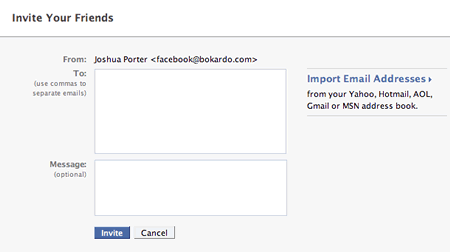
Facebook Invite Friends

You’ll notice one big difference between the Facebook and MySpace invite screens. Facebook allows you to import addresses from various third party email systems. You can grab your contacts from webmail services such as Gmail, Yahoo Mail, and Hotmail. You can also import contacts from your desktop mail applications as well.

It is probable that the Facebook invite screen causes more invitations to be sent than the MySpace invite screen. They’ve made it much easier to add large amounts of contacts without having to type in the addresses by hand. Imagine typing more than a couple email addresses in that tiny little window! Also, we have to ask: how many email addresses do we remember anyway? Even if we typed in all that we could remember, we would still have less than is what is in our contacts list. The Facebook interface makes all that hassle a non-issue.

Does Facebook’s design have an effect?

So how much of an effect would this design difference make? Obviously, the Facebook interface allows many more people to be invited more quickly, suggesting that Facebook has the potential to grow faster. Indeed, that does seem to be the case, as evidenced by recent Compete stats.:

However, there are innumerable other factors involved as well. What about the email that gets sent out for the invite? Is it compelling? Does it entice people to click? The complete process of Designing for Word of Mouth has many steps of which the invite screen is only one.

Therefore, we cannot pin Facebook’s growth on this particular invite interface. What we can say, however, is that a consistent focus on issues like these will have a positive effect over time. So while the interface probably isn’t the only reason why Facebook is growing faster, it most likely contributes to it. If many design decisions like this are made throughout a site, they can have a significant effect.

Facebook’s Progressive Disclosure

Additionally, the popup you get on Facebook when you press “Import Email Addresses” is nicely done:
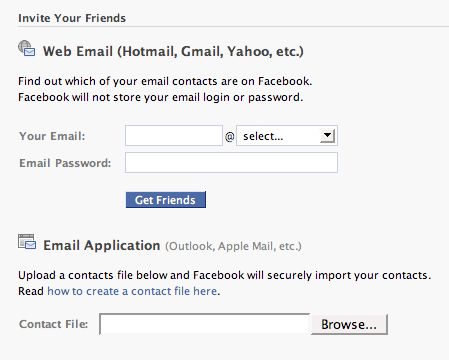
Facebook Invite Friends Popup

You’ll notice they’ve separated out the two activities (that were one activity in the previous screen). This is an example of progressive disclosure…only providing enough detail as needed at the moment and providing more when the context necessitates it. On the previous screen the “import email address” looked like a single activity. Now, as we progress further it’s actually split into two activities.

Facebook also adds a link for “how to create a contact file”, a nice touch for those folks unfamiliar with how that works.

These invite screens are a good example of different approaches to the same problem. One requires lots of typing…the other requires none.

Comments ( 13 Responses so far )

1.  Rahul on August 7th, 2007 (Comment) #

Certainly of note in the case of Facebook: there are multiple ways to get to this page, including the “Find Friends” option which very handily allows you to extract your list of friends from an email account and then checks to see if they’re already on Facebook. If so, you can shoot them an invite; if not, you can .. shoot them an invite.

I’m continually impressed by Facebook every time I use it. In many ways, it’s the epitome of a controlled user interface exposed to a massive audience. And if you look at Facebook apps, the most successful ones are the ones that have great interfaces and seamlessly integrate into the Facebook environment.

Very valuable learning, indeed.

2.  Fred on August 7th, 2007 (Comment) #

I love this “Interface Compare” post. Please continue with this brilliant idea :)

3.  Tom on August 7th, 2007 (Comment) #

I don’t know if this is true on MySpace but when your just starting out on Facebook, there’s a little top bar that appears above your newsfeed with just the Web Email textboxes. Facebook should add a stamp though …

4.  magpie (larah) on August 7th, 2007 (Comment) #

Thanks for the straight forward example of progressive disclosure. Now maybe I can get the dang interface designer to understand what I want and why!

I agree with Fred more of these comparisons, please

5.  May on August 7th, 2007 (Comment) #

MySpace may not have the invite friends page down, but you are prompted to email any person you search for through people search that has no results. It also has a way of going through 3rd party email systems to find which friends are already on Myspace, which then leads to suggesting you invite all your friends that are NOT already on MySpace. Why they don’t have all these features together in one place, is beyond me.

I like this compare post idea. Keep it up!

6.  Adam Darowski on August 7th, 2007 (Comment) #

Yes, excellent idea for a series. I look forward to more. I guess the Mac OS X vs. Vista shutdown screens have been done to death. Good to see some from our favorite web apps.

And this “crawling your email to find your contacts” thing… Man, I felt really dirty the first time I let LinkedIn do it. But you know what? it’s much easier than one-by-one. Now, I periodically run it through my GMail to see if anyone I’ve recently come into contact is on or if someone already in my contacts has joined.

Good stuff. Thanks!

7.  Chris on August 7th, 2007 (Comment) #

I don’t have a Facebook.

But - I just wanted to point out that MySpace does have a contact book crawler similar to the one shown above for Facebook.

It is on your ‘home page,’ it is not linked to the ‘invite’ menu tab.

Keep up the good articles!

8.  Serollah on August 8th, 2007 (Comment) #

Once upon a time, I felt a thrill of belonging, being wanted and special, when I was invited to be someone’s “friend” or a desired “contact” .. now that I know it’s as easy as importing an entire address book into Facebook .. I feel cheap and used .. not a special friend at all .. oh the humiliation ..

Great new feature, BTW, looking forwward to the next installment .. when I can have my self esteem degraded all over again ;)

9.  Marcel Kornblum on August 8th, 2007 (Comment) #

Hey this is a great idea for a series, and nicely done! You made me think about a couple of things too - I posted an entry about this entry here: http://blog.marceletc.info/2007/08/designing-for-word-of-mouth-and-using.html#links

Cheers and keep it up!

Pingback: Interface Compare: Inviting Friends on MySpace & Facebook of Myspace Html Codes Blog

10.  Jason on August 13th, 2007 (Comment) #

Hey folks. It’s actually incorrect that MySpace doesn’t have an address importer. If you have a MySpace page, it is actually there on the home page.

While I like the interface comparison format, it would be worth being factually correct.

Pingback: finding friends on myspace facebook

11.  valerie on August 7th, 2008 (Comment) #

I received an invite from a friend (not a student), who just opened a Facbook account, and I’m horrified that my name and Email address is now posted somewhere on his account as an invited “friend”, completely without my consent. I’m pretty sure he imported his whole AOL address book to do this, and I’ve asked him to delete my name at once.

I have no argument with anyone who wants to participate in Facebook, but I resent the privacy threat of giving them your whole list without the consent of any of the people on that list. There’s no reason people could not merely send a message to all their contacts directly from their Email program, telling them how to join Facebook if the recipients want to participate.

Add Your Comment

Accepted tags: <a href="" title=""> <abbr title=""> <acronym title=""> <b> <blockquote cite=""> <cite> <code> <del datetime=""> <em> <i> <q cite=""> <strike> <strong> .

Preview...

If your comment contains links, or if it is your destiny, your comment may not show up immediately. I'll approve it as soon as I can. (I delete dozens of comment spams per day)

Get updated when someone posts a comment: Comment Feed


ABOUT

Bokardo is the blog of Joshua Porter, a web designer/developer, researcher, and writer. I live in Newburyport, MA, USA.

WHAT IS SOCIAL DESIGN?

Social design is design that focuses on the social lives of users. It deals with the activities, behaviors, and motivations of people who work and play together through software interfaces. It is built on the observation that many of the decisions we make are greatly affected by those we surround ourselves with in our social lives: our family, friends, and colleagues. Exploring our motivations and how to design interfaces to support them is what the Bokardo blog is all about.

Designing for the Social Web

Building a social web site or application? I wrote a book just for you!

designing for the social web

Find out more or order from Peachpit or Amazon

Upcoming Speaking Events